


Kala: Learn Ukulele & Tuner
4.6760.00 Reviews
App Specs
- Version
- 3.19.3
- Updated On
- License
- Free
- Downloads
- 500,000+
- Developer
- Musopia
- Categories
- Music & Audio
- Platform
- Android
Screenshots



 Analysis by AppCompare
I like ukulele apps best when they help me move from “I’d like to learn” to actually picking up the instrument for a few minutes today. Kala: Learn Ukulele & Tuner is built around that practical combination: tuning, lessons and songs in one place. It is a music-learning app from Musopia, and its beginner-friendly approach makes it a natural starting point if you own a ukulele but are unsure what to practise first.
Who will get the most out of it
I’d recommend Kala most readily to a new player who wants guidance without committing to a formal lesson schedule. A short session can have a clear purpose: tune the strings, work through a lesson, then try applying the idea to a song. That structure is more useful than opening a video site and hoping the next tutorial happens to match your level.
It can also suit someone returning to the instrument after a break. If you already know a few basic shapes, revisiting a lesson and following a song can help rebuild the habit. But players who want detailed, personal correction from a live teacher should treat an app as practice support, not a substitute for a person watching their hands and listening closely.
A small practice routine that makes the features work harder
For a realistic weekday routine, I’d use the tuner first, choose one short lesson goal, and finish by playing a song section rather than trying to master an entire piece. For instance, if a chord change keeps interrupting the rhythm, I’d isolate that transition and repeat it slowly before returning to the song. The point is to practise a specific problem, not simply spend more time in the app.
There’s a useful trade-off in having lessons and songs together: the lesson can explain an idea, while the song gives you a reason to use it. Still, a song can tempt beginners to rush ahead because they recognize the tune. I’d resist that urge. A clean, even change at a slower pace is a better milestone than a fast run-through full of pauses.
How it differs from common learning options
Compared with a general video platform, Kala gives a ukulele learner a more focused route through tuning, instruction and playing songs. Videos elsewhere can be excellent, especially when you want to compare several teachers’ explanations, but it takes more effort to choose a sensible next lesson and keep practice connected. Kala’s advantage is convenience and a single learning context, not a guarantee that every explanation will suit every learner.
Against a printed chord book, the app’s lessons and play-along approach can make rhythm and timing feel less abstract. A book, on the other hand, is easy to consult without following a screen and may be preferable if you mainly need a reference for chord shapes. I see Kala as most useful when I want an activity to follow, rather than just a chart to glance at.
Worth Reading Before You Choose

Flipboard Shows What News Apps Must Do Beyond the Feed

Switching to Android Auto Means Rethinking Your Driving Routine

Google Calendar Makes a Crowded Week Easier to Manage

Ludo King Makes the Most of the Minutes Between Plans

Baby Panda World Brings Quick Play to Modern Phones, but Its Game Library Feels Busy

ESPN’s Live Game View Makes Following Close Games Easier
It is free to download, though in-app purchases range from $2.99 to $229.99 per item, so I’d check what is included before treating the whole learning path as free. The app is rated for Everyone and has an average rating of 4.6 from around 5,100 ratings. Those figures offer some context, but they can’t tell you whether its teaching style or song choices will fit your taste.
Practical limits and expectations
A tuner is most helpful when you can hear each string clearly. In a noisy room, tuning by ear and watching a screen can both become frustrating, so I’d tune somewhere quiet and pluck one string at a time. That simple habit makes the tuning step less likely to derail the rest of a short practice session.
Another consideration is screen-based learning. It can be convenient to replay an explanation, but looking back and forth between a device and your fretting hand may interrupt concentration. I’d watch a short section first, put the device where I can see it, then practise the movement in repetitions rather than constantly pausing mid-strum.
If you already have a teacher, Kala can still be useful for tuning and extra practice, but I’d follow the teacher’s technique when the two approaches differ. If you need tailored feedback on posture, finger pressure or a persistent pain point, a general lesson is not enough reason to push through discomfort; stop and get appropriate guidance.
Getting Started with the Basics
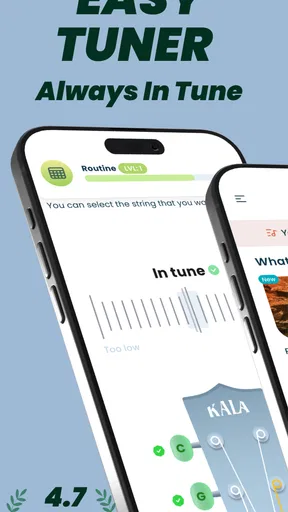
Alright, so first things first. Once you download the app, you’re greeted with a sleek and user-friendly interface. It’s nothing too flashy, which is great because it means you won’t get lost trying to find your way around. The app kicks off with the essentials. You’ve got your tuner, which is super important for keeping your ukulele sounding sweet. Trust me, nobody wants to hear off-tune strumming!
The tuner is really intuitive. You just pluck your string, and the app’s needle shows you how close you are to being in tune. It’s fast and accurate, and before you know it, you’ll be ready to jam. Plus, the app supports both standard GCEA tuning and more exotic options like DGBE, so you can experiment to your heart’s content.
Lessons: From Beginner to Pro
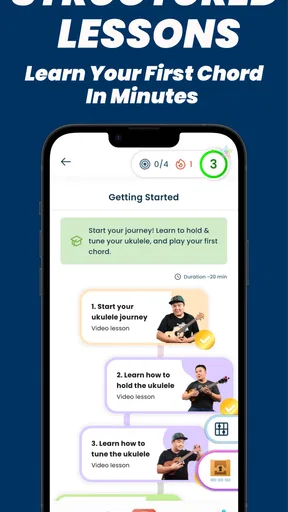
Once your uke is in tune, it’s time to dive into the lessons. Kala: Learn Ukulele & Tuner offers a range of lessons that cater to different skill levels. Whether you’re a complete newbie or someone who knows their way around a few chords, there’s something for everyone. What I love about this app is that the lessons are broken down into bite-sized videos, so you’re not overwhelmed with information all at once.
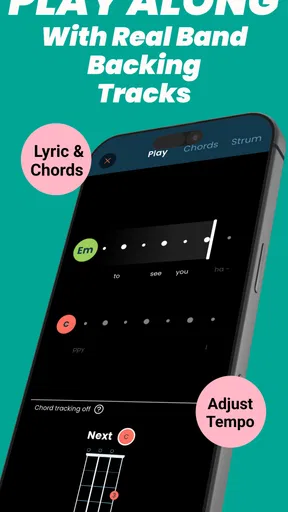
The instructors are engaging and explain techniques in a way that’s easy to grasp. You can learn at your own pace, rewinding and replaying parts until you nail that tricky chord transition. The app even includes a ‘play along’ feature, so you can jam with the instructor and get a feel for the rhythm and groove of each piece.
Interactive Song Library
Here’s where things get really exciting. The app boasts a vast song library that’s constantly updated. From classics to current hits, there’s a wide variety of tunes to choose from. You’ll find yourself strumming along to your favorite songs in no time. The app provides chord charts and lyrics, so you’re not just memorizing notes—you're actually playing music.
What’s really cool is the app’s ability to slow down or speed up the tempo of the songs. This feature is perfect for when you’re trying to master a new tune. Start slow, get the hang of it, and gradually work your way up to full speed. It’s like having a personal practice session that adjusts to your pace.
Community and Feedback
One of the things that makes learning an instrument enjoyable is sharing your progress and getting feedback. Kala: Learn Ukulele & Tuner understands this and includes a community feature where you can connect with other learners. You can share your recordings, get tips and encouragement from fellow uke enthusiasts, and even showcase your progress.
There’s also a feedback option where you can submit recordings of your playing and receive constructive critiques. This is a fantastic way to improve and boost your confidence as you grow as a musician.
Product history and what to watch
Kala has been available since January 13, 2016, and its current version is 3.16.0. That gives the app an established place in ukulele learning rather than making it feel like a newly launched experiment. It has passed 500,000 installs, while its 688 written reviews provide a different kind of snapshot from its ratings: readers can look for comments about teaching style, song practice and the features they personally use.
For existing users, a current version number is useful context, but it does not by itself tell me exactly what changed between releases. I wouldn’t assume that a particular lesson, song or interface detail has recently been added or revised. What matters in daily use is whether the current app continues to fit your routine, and whether its learning material gives you a sensible next step instead of leaving you browsing without practising.
The app supports devices running Android 8.0 or later. Before installing, I’d check that your device meets that requirement, especially if you’re using an older phone or tablet. It is a small practical check that can save the annoyance of planning a practice session only to discover the app is not compatible with your device.
What I’d watch over time is whether the app’s lesson path continues to serve both absolute beginners and people who have moved beyond the first chords. A useful learning app should make the next challenge feel achievable, not merely offer more material. I’d also keep an eye on the purchase details before choosing paid content, since the range of in-app item prices is broad and the right value depends on what you intend to use.
Final Thoughts
So, is Kala: Learn Ukulele & Tuner worth checking out? Absolutely! Whether you’re just starting out or looking to refine your skills, this app is packed with features that make learning the ukulele fun and accessible. The combination of a reliable tuner, engaging lessons, a diverse song library, and a supportive community creates a comprehensive learning experience.
If you’re ready to let your musical talents shine and serenade the world with your ukulele prowess, give this app a go. You might just find yourself strumming away for hours and discovering a new passion. Happy strumming!
Pros
- User-friendly interface for beginners.
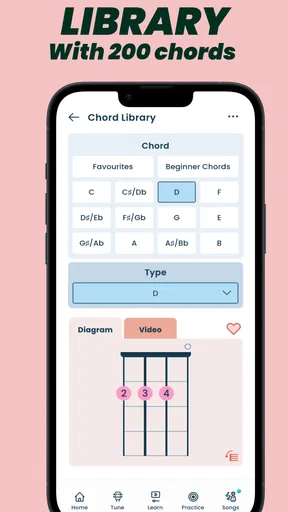
- Comprehensive chord library available.
- High-quality ukulele tuner included.
- Interactive tutorials enhance learning.
- Offline access to lessons and songs.
Cons
- Limited free content availability.
- In-app purchases can be costly.
- Requires registration to access features.
- Occasional app performance issues.
- No advanced level tutorials provided.
FAQs for Kala: Learn Ukulele & Tuner
What features does Kala: Learn Ukulele & Tuner offer?
Kala provides comprehensive lessons for beginners and intermediate players, covering chords, strumming patterns, and songs. It also includes a precise tuner, ensuring your ukulele is always in tune. The app offers a user-friendly interface with video tutorials and interactive exercises, making learning engaging and effective.
Is the Kala app suitable for complete beginners?
Yes, Kala is designed with beginners in mind. It offers step-by-step lessons starting from the basics, such as holding the ukulele and tuning it. The app gradually introduces more complex techniques, ensuring users develop a solid foundation before progressing to advanced skills.
Does Kala: Learn Ukulele & Tuner require an internet connection?
While some features of Kala, such as downloading new lessons or accessing community content, do require an internet connection, the app can function offline for previously downloaded content. This makes it convenient for users who want to practice anywhere, regardless of internet availability.
Are there any in-app purchases in Kala: Learn Ukulele & Tuner?
Kala offers a free version with basic features, but to unlock advanced lessons, additional songs, and premium content, users may need to make in-app purchases. These purchases enhance the learning experience, providing more resources and tools for dedicated learners.
Can I track my progress with Kala?
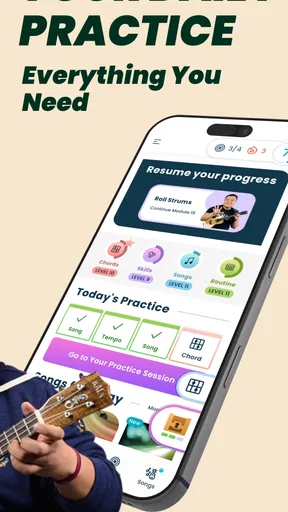
Absolutely. Kala includes progress tracking features that allow users to monitor their improvement over time. The app records completed lessons, mastered songs, and provides feedback on areas that need improvement, helping users maintain motivation and achieve their learning goals.


